Microsoft will remove eight Copilot actions from the Windows 11 File Explorer right-click menu
IA en un minuto newsroom · Editor: Jon Elgezabal
In 30 seconds
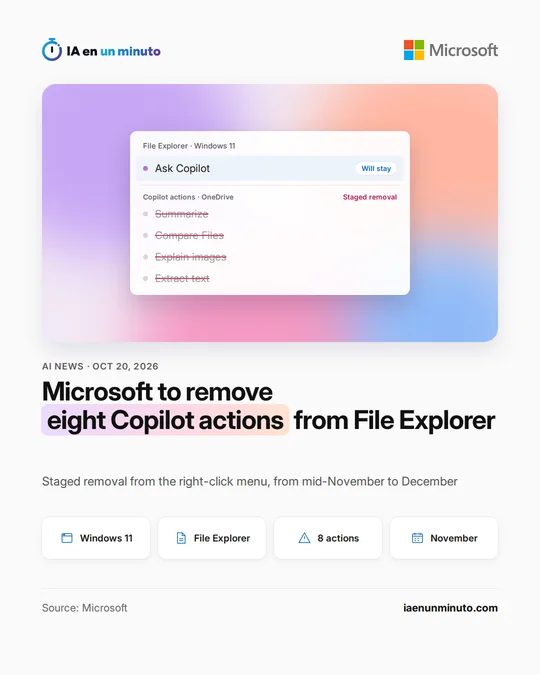
Microsoft will begin taking away, in mid-November, eight Copilot shortcuts that appeared when right-clicking OneDrive files in Windows 11. The Ask Copilot option is not going away, and the same features will still be reachable from the OneDrive activity center. Windows Latest places it within the Copilot pullback in Windows and Outlook after criticism.
Microsoft will remove eight actions of Copilot, its AI assistant, from the menu that appears when right-clicking a OneDrive file in the Windows 11 File Explorer. It told Microsoft 365 administrators in notice MC1515940 of its message center, published on Monday, October 19, and outlets such as Windows Latest and The Register have reported it.
The actions going away are summarizing, creating an FAQ, asking a question, comparing files, comparing images, explaining a single image or several, and extracting text. They only showed up with OneDrive files, Microsoft's cloud storage service, meaning when the app was installed or the files were synced with it, according to Windows Latest. In the notice, Microsoft says this makes Copilot simpler to use with those files, and the outlet adds that the company also talks about cutting down entry points.
The removal starts in mid-November worldwide, and Microsoft expects to finish it in early December. Because it will be gradual, some users will keep seeing those actions for a few weeks. Two things remain: the "Ask Copilot" option in the right-click menu, which opens a conversation with the file attached, and the Copilot icon that shows up when hovering over a file on the File Explorer Home page. The actions will also stay in the OneDrive activity center. According to the notice, files are attached by reference, so they keep their permissions and protections. Administrators do not need to do anything, although Microsoft advises them to let users know and to update any training and support documentation that mentions those actions.
Microsoft had introduced these actions in September 2025, and in March 2026 Windows chief Pavan Davuluri announced that unnecessary Copilot entry points would be reduced, according to The Register. Since then the company has removed or renamed Copilot in apps such as Snipping Tool, Photos and Notepad, and in the new Outlook it is retiring themes created with Copilot, according to Windows Latest. The outlet frames this removal as part of that Copilot cutback in Windows and Outlook, which follows user criticism.
Why it matters · analysis and opinion
The pullback says a lot about how AI is settling into the workplace: putting it in every menu does not guarantee it gets used, and over time it can become a nuisance. Microsoft is now concentrating access to Copilot in a single entry point, which leaves a cleaner interface without taking the feature away from those who want it. For IT departments the change is simple, since it requires no configuration, but it is a good moment to tell staff and review internal guides or support manuals that mention those shortcuts. Anyone who uses them daily will have to get used to opening the conversation with Copilot and asking for the same thing in their own words.
Source: Windows Latest · Written with the help of AI: how we make the news
What does it mean for your business? · analysis and opinion
This change affects small businesses and freelancers in Spain and Latin America who work with Windows 11 and keep their files synced with OneDrive, which is when these Copilot actions showed up in the right-click menu. For anyone who does not use OneDrive, or who had not yet received these options on their computer, nothing changes: according to Windows Latest, some users never even got them.
In practice, it makes sense to identify the people on the team who had got used to summarizing a document or pulling the text out of an image with one click, and to show them the alternative route before mid-November, when the removal begins. The features are not going away: they will still be reachable through the "Ask Copilot" option in the same menu, the File Explorer Home icon, the OneDrive activity center, or directly in the Copilot and OneDrive apps. Our advice is to write this down in a short internal note and in the onboarding guide for new staff.
The news does not mention any changes to pricing or licenses, so the only cost is time. The risk is small, although there may be some confusion for a few weeks: because the removal is gradual, some computers will keep the actions until December while others will no longer show them. If there is an internal procedure with screenshots of the old menu, the sensible thing is to update it.