Proton launches desktop apps for Lumo, its chatbot, with folder access and scheduled tasks
IA en un minuto newsroom · Editor: Jon Elgezabal
In 30 seconds
Lumo, Proton's assistant, stops relying on the browser and installs on Windows, macOS and Linux. Connectors, scheduled tasks and Skills give it files, email and outside services, jobs at set times and saved instructions. Proton lets each person decide what it does alone, what needs permission and what stays off limits, and SoftZone notes the free account works with limits.
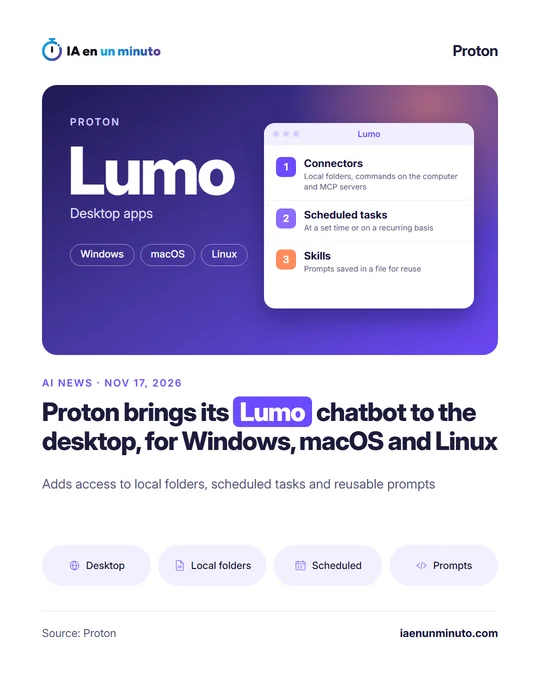
Proton, the company known for Proton Mail and Proton VPN, has released Lumo Desktop, the desktop version of its Lumo chatbot, for Windows, macOS and Linux. It made the announcement on its official blog on Tuesday, November 17. Until now, as SoftZone notes, Lumo was mainly used from the browser.
The app debuts three features. Connectors let Lumo look up information and do things in whatever it is linked to: files and commands on the computer itself, Proton Mail, third-party services such as Jira or Google Drive, and MCP servers, an open standard for hooking assistants up to external tools. With scheduled tasks, Lumo carries out a job at a set time or repeats it at intervals, such as a weekly email digest. Skills store instructions that the assistant applies again in other conversations; existing Custom Lumos turn into Skills automatically.
When each Connector is set up, actions are split into three groups: those Lumo does without asking, those that need approval and those that are blocked. Proton's example is letting it search the inbox, asking permission before it sends an email and stopping it from deleting messages. Scheduled tasks carry their own permissions too and can be paused or removed.
Signing in takes a Proton account. According to SoftZone, the free one is enough, with usage limits the company does not put numbers on, and paid plans raise those limits; Proton has not given prices for this launch. The company says it publishes the source code so that anyone can check how these tools work.
Why it matters · analysis and opinion
The race between assistants is no longer only about the quality of the answers, but about what they can touch inside the computer. Proton enters that ground with its own argument against the big players: permissions action by action and code in the open. For anyone handling client data or sensitive documents, the split between what is automatic, what asks for approval and what is forbidden is the part that deserves the most time during setup. The prudent move is to start with the minimum, searches and reading, and leave sending and deleting for when its behaviour is well understood. It remains to be seen what real limits the free version has and how it performs in daily work.
Official source: Proton · Written with the help of AI: how we make the news
What does it mean for your business? · analysis and opinion
This affects freelancers and small businesses in Spain and Latin America that are looking for an AI assistant and value privacy, especially if they already use Proton Mail. For anyone who uses Lumo only through the browser, nothing changes, because the new features are only in the desktop application for Windows, macOS and Linux. The free option requires a Proton account and has usage limits without published figures, and Proton has not specified the prices of the paid plans in this launch, so it is worth checking the current rates before subscribing. The sensitive point is the Connectors. Letting an assistant into local folders and allowing it to run commands on the computer means that a mistake on its part can affect real files. Our advice is to start with the mode that asks for approval before each action, not the automatic one, and to connect only a test folder, without invoices, contracts or client data. The prudent approach is to install it first on a computer that is not the main one used for the business. Something similar happens with scheduled tasks: a weekly email summary written by the assistant is best treated as support and always reviewing the original message before responding to a client or making a decision. Skills, on the other hand, carry little risk and can save time for anyone who often repeats the same instructions, for example to draft quotes or template responses.