Google Vids Lets You Turn Photos Into Custom AI Avatars
IA en un minuto newsroom · Editor: Jon Elgezabal
In 30 seconds
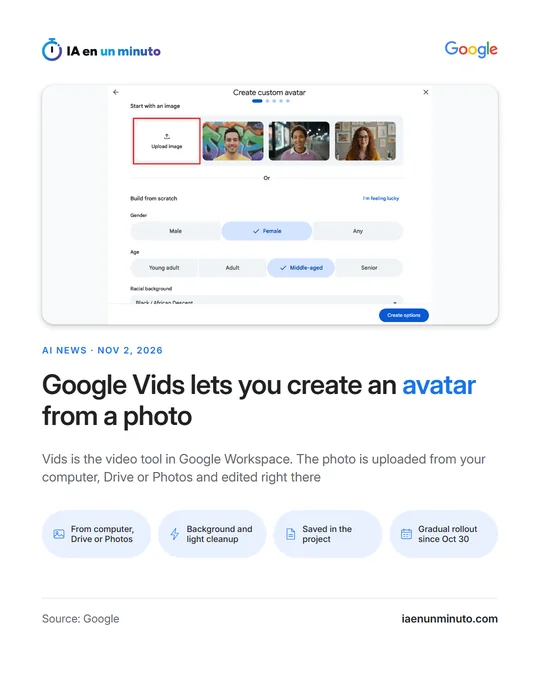
Google Vids, the video service in Workspace, adds the option to start from an image of their own to generate an avatar, on top of building one from scratch. A photo may be brought in from the user's device, Drive or Google Photos and is polished without leaving the app. Google is rolling the feature out gradually since October 30 and offers no admin control for it.
Google Vids, the video tool in Google Workspace, can now create a custom avatar from an image that the user uploads. Until now the route was to build one from scratch; uploading an image is added to that option rather than replacing it, and it gives more precise control over the result.
According to the Google Workspace announcement of November 2, the image can come from the computer, from Drive or from Google Photos. Inside Vids it can be touched up, for instance to clean up the background or the lighting, or to add festive decorations, and the avatar is saved in the project so it can be reused consistently throughout the video.
It is included in the Workspace Business (Starter, Standard and Plus), Enterprise (Starter, Standard and Plus) and Education Plus plans, and also in personal accounts with Google AI Pro or Ultra. Google also lists Enterprise Essentials, the nonprofit editions and the individual ones.
The rollout is gradual. On Rapid Release domains it began on October 30 and can take up to 15 days to become visible; on Scheduled Release domains it arrives from November 20, with one to three days before it shows up. Google says this feature has no admin control.
Why it matters · analysis and opinion
The change shifts the starting point: instead of describing an avatar from scratch, whoever makes the video brings a specific image, which is what matters most in a corporate or training piece. Having the avatar saved in the project helps keep the same character from start to finish. There are two points to watch. The feature comes with no admin control, so an organization cannot regulate it separately, and the announcement does not explain which rules apply when the uploaded image shows someone else. Before using it, a company can set down in writing whose images are uploaded and what they will be used for, and check whether the result works in a real video.
Official source: Google Workspace Updates · Written with the help of AI: how we make the news