Claude now works inside Google Docs, Sheets and Slides with a public beta add-on
IA en un minuto newsroom · Editor: Jon Elgezabal
In 30 seconds
Anthropic is rolling out a public beta add-on for Google Docs, Sheets and Slides, open to anyone on a paid Claude plan. Claude works from a panel beside the file: it understands the selection, writes formulas, prepares slides and, unless automatic mode is on, asks before every change. The add-on comes through the Google Workspace Marketplace, and an administrator can switch it on for the whole company or only some groups.
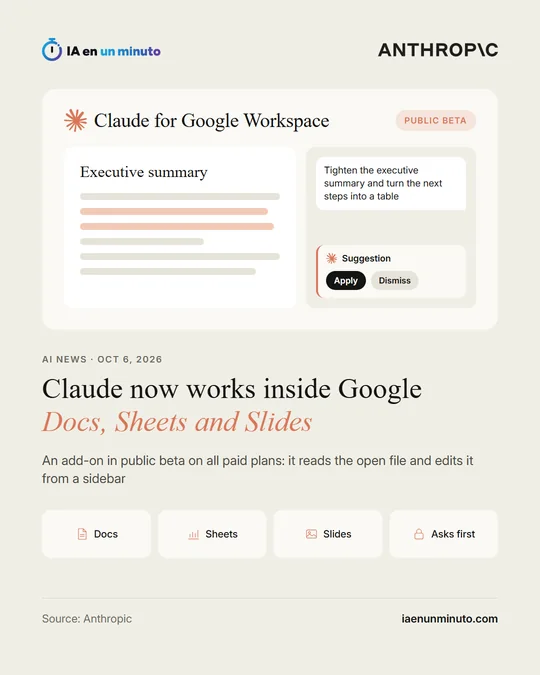
Anthropic has launched Claude for Google Workspace, an add-on that brings its assistant to Google Docs, Sheets and Slides, Google's documents, spreadsheets and presentations. It is in public beta on all paid Claude plans.
Claude opens in a sidebar next to the file: it reads the open doc, sheet or deck, sees what the user has selected and makes changes directly in the file. In Docs it can fix a sentence or restyle a heading without touching the surrounding formatting and, for bigger rewrites, it proposes suggestions that can be applied or dismissed one by one. In Sheets it writes formulas, builds pivot tables, charts and new tabs, and can pull data into Python to join or clean it. In Slides it builds new slides from the deck's layouts and theme, and flags elements that overlap, run off the slide or text that is hard to read.
By default, Claude asks for approval before each change; in "Accept all edits" mode it applies them without stopping. The sidebar has the same models, connectors (links to other apps) and skills (saved instructions to repeat a task) that the user has in Claude. On Enterprise plans, enterprise controls also apply, such as customer-managed encryption keys and audit log export.
Anthropic is also releasing, in beta as well, Google Docs, Sheets and Slides connectors to create and edit Google files from the Claude chat itself. Access matches the sharing permissions each file already has in Google.
The add-on is installed from the Google Workspace Marketplace, and admins can deploy it to their whole organization or to selected groups from the Google Admin console. On Team and Enterprise plans, an account owner has to enable the connectors first.
Why it matters · analysis and opinion
Copying and pasting between the Claude window and a Google document is no longer necessary: the assistant reads the open file, sees the selection and edits in place, keeping the formatting. The main winners are teams that already pay for Claude and work in Docs, Sheets and Slides, because they keep their connectors and skills inside the sidebar; companies on the Enterprise plan also keep their encryption and audit controls. The sensitive decision is the working mode: by default it asks permission for each change, while the accept-all option edits without stopping, which is risky in a beta that touches sheets with real formulas. On Team and Enterprise plans, the connectors will not be available until the account owner turns them on.
Official source: Anthropic · Written with the help of AI: how we make the news