Check Point launches a feature to protect AI agents from booby-trapped documents
IA en un minuto newsroom · Editor: Jon Elgezabal
In 30 seconds
PromptGuardX, Check Point's new feature, scans every PDF for buried commands before an AI agent or copilot gets to read its contents. The tool exposes concealed layers, invisible text and character tricks, and flags the passage that set it off along with a confidence level. It sits inside Threat Emulation, and Check Point admits that more defenses are still required.
Check Point Software, the cybersecurity company, introduced PromptGuardX on Tuesday, October 6, a feature that checks PDF files for hidden instructions before their content reaches an AI model, a copilot or an agent.
The problem it targets is indirect prompt injection (prompts are the instructions an AI receives): someone hides commands inside a PDF, an email or a website and waits for an AI system to read it. A person sees a normal document, but the AI processes text extracted from the file's underlying structure, where there may be invisible text, concealed layers or manipulated Unicode characters. According to Check Point, the file may contain no malware at all and still carry an instruction meant for the agent.
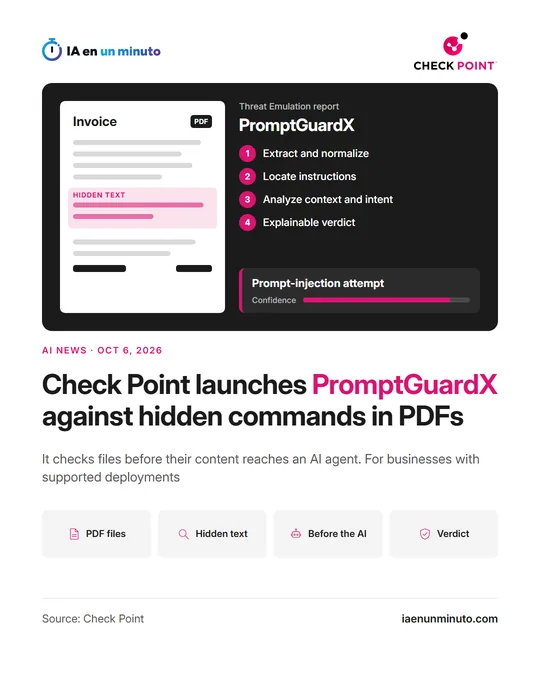
In its demonstration, a normal-looking invoice contains a hidden instruction. When an AI system is asked to summarize the document, the instruction attempts to make it launch the computer's calculator, a safe stand-in for running a command. The invoice contains no executable and exploits no PDF vulnerability, so the action depends on an AI system reading the instruction, following it and having access to the right tool. In a company, Check Point explains, a similar instruction could attempt to retrieve supplier records, send information elsewhere, change payment details or invoke a tool unrelated to the user's request.
PromptGuardX analyzes each PDF in four stages. It extracts the text an AI system would receive, including hidden text, and normalizes characters to undo common disguise techniques. It locates suspicious regions, such as text that impersonates system instructions or asks the AI to ignore previous instructions. It analyzes the context with a fine-tuned classifier that tells apart text that discusses an instruction from text that attempts to issue one. And it produces a verdict with a confidence score and the specific text that triggered it.
It is integrated into Threat Emulation, the Check Point system that inspects files for malware, malicious URLs and suspicious behavior, and it is available in supported deployments across Quantum, Harmony Email & Collaboration and Threat Emulation-enabled gateways. The announcement gives no price. Check Point itself acknowledges that no single control eliminates this kind of attack and that other protections are still needed, such as prompt inspection, runtime monitoring, least-privilege access and action-level enforcement.
According to its AI Security Report 2026, detections of longer malicious prompt payloads increased approximately fivefold between March and May 2026, approaching 1% of observed prompts in May.
Why it matters · analysis and opinion
Until now, checking a file meant asking whether it carried malware. With agents that read invoices and other documents on their own, the question becomes whether the text is trying to give them orders, and a cybersecurity vendor building that into its file inspection shows the risk has already left the lab. That said, for now it analyzes PDFs and works inside Check Point's own products, so it does not replace the basics. Anyone who already lets an AI assistant read outside documents and then act can start today with three things: give it minimal permissions, require a person to confirm payments or data transfers, and keep document reading separate from the tools that carry out actions. The filter sits in front of the agent, but the damage depends on what the agent is allowed to do.
Official source: Check Point · Written with the help of AI: how we make the news