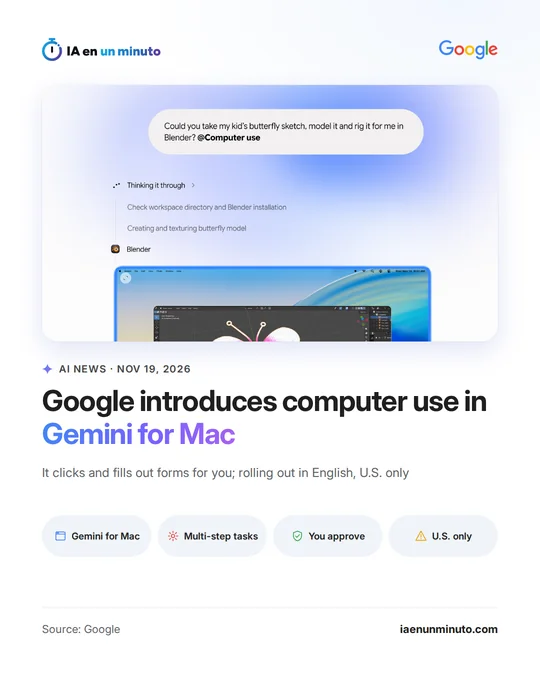
Google adds computer use to Gemini for Mac for multi-step tasks, for now in the U.S.
IA en un minuto newsroom · Editor: Jon Elgezabal
In 30 seconds
Gemini for Mac gains an option for the AI to click, type and fill in forms across files, apps and websites from a single request. Google runs it in an isolated window and lets the user pick the apps, pause it and approve the key steps. United States users are the only ones for now, in English and for Google AI Ultra, Pro or Plus subscribers on a Mac with Apple silicon.
Google today, Thursday, November 19, added computer use to the Gemini app for Mac: a feature that lets the AI operate the machine's files, desktop applications and websites on its own. The user describes a task that takes several steps and Gemini does the clicking, writes text, opens menus and completes forms, the company explains on its blog.
The work happens in a separate, isolated window running in the background, and the chat shows live what it is doing. That leaves the main screen and the pointer free for other things. According to Google, the user decides which applications Gemini may open, can follow each step and pause it whenever they like, and important actions need their approval first.
Among the examples the company gives: taking weights, measurements and addresses from PDFs stored on the Mac to fill in shipping quotes for several boxes, gathering figures and screenshots from dashboards in different regions to put together a Google Slides presentation, or turning a child's butterfly drawing into a Blender 3D model ready to animate.
For now it is rolling out only in English and in the United States. It requires a Mac with an Apple chip (Apple silicon) running macOS Sequoia 15.0 or later, a personal Google account for people aged 18 or over, and a Google AI Plus, Pro or Ultra subscription. Google has not said when it will reach other countries or languages.
Why it matters · analysis and opinion
The change is where it happens: Gemini stops just answering in the chat and starts acting inside the Mac itself, across files, apps and websites. Doing it in a separate window removes a practical drawback of this kind of agent, leaving the user without a screen while the AI works. Choosing which apps it can enter and approving the important steps points to what most holds back its use: trust. For businesses and professionals outside the United States, for now it is a sign of where desktop assistants are heading: the repetitive work of copying data from documents into forms is exactly where they want to prove their worth. It remains to be seen when, and in which languages, it will reach everyone else.
Official source: Google · Written with the help of AI: how we make the news
What does it mean for your business? · analysis and opinion
For now, this does not reach businesses in Spain or Latin America: Google is rolling it out only in English and in the United States, inside the Gemini app for Mac. Anyone working outside that market cannot use it yet, so today there is nothing to sign up for or change. It does matter to freelancers and small businesses that lose hours copying data from one place to another, such as moving weights, dimensions, and addresses from a PDF into a shipping form, or building a presentation with figures from several dashboards, because that is exactly the kind of task Google gives as an example.
Our advice is to use the wait to prepare the ground. It is worth noting which repetitive daily tasks could be delegated and which should never be left in the hands of an agent, such as payments, passwords, or messages sent to clients. Once the feature is available, the sensible approach is to start with a single app and a test folder, without sensitive documents, and to follow the live preview closely the first few times.
The risk lies in the permissions: an agent that clicks and fills out forms on someone else's behalf can make mistakes just as quickly as it gets things right. That is why it is worth calmly reviewing each key action before approving it and pausing the task as soon as something does not look right. The fewer apps it has authorized, the fewer things that can go wrong.