Gemini can now write Apps Script automations for people who don't code
IA en un minuto newsroom · Editor: Jon Elgezabal
In 30 seconds
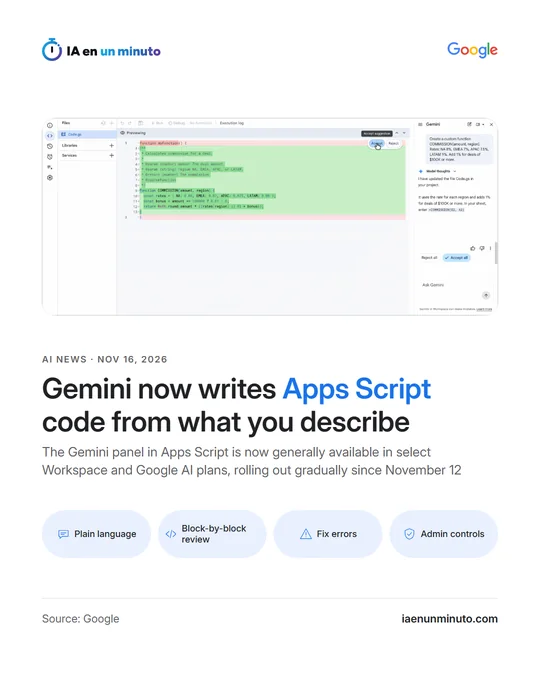
Gemini now drafts scripts for Sheets, Docs, Slides and Forms from a simple description, with no need to know how to program. Google is taking its Apps Script side panel out of beta; it shows changes in blocks and, when something breaks, explains the error and offers a fix. Workspace gets it gradually from November 12, with a wait of up to 15 days depending on the domain.
Google has moved the Gemini side panel in Apps Script to general availability. Apps Script is the tool built into Sheets, Docs, Slides and Forms for customising, connecting and automating work in Workspace. The feature comes out of a public beta the company ran earlier this year, and its rollout began on November 12.
The pitch is that any employee, coder or not, can put a repetitive task into ordinary words and get the code back already written. Google's examples include building Calendar events out of urgent Gmail messages, pulling in and cleaning live data, and converting Sheets tables into Docs reports with formatting. Gemini takes the files of the open project into account, and the conversation can continue to add features such as automatic triggers that fire on a schedule.
Its proposals are not applied blindly. The editor lays them out in blocks, and each can be accepted or rejected separately, although there are also buttons to approve or discard everything at once before saving. When a script fails, the "Fix errors" button in the execution log has Gemini diagnose the failure, describe it in simple terms and suggest a correction that is ready to apply.
Google stresses that scripts run inside Workspace with the permissions the user already holds and with the usual OAuth consent. Admins keep control from the Admin console: the feature follows the Apps Script service settings and the access controls for generative AI, it can be switched on by organisational unit or by group, and activity is recorded in the Drive and OAuth audit logs.
It is available to customers on Business Standard and Plus and on Enterprise Standard and Plus, to those with the AI Expanded Access add-on or Google AI Pro for Education, and to Google AI Pro and Ultra subscribers. The rollout is gradual in both Rapid Release and Scheduled Release domains and may take up to 15 days to show. The panel opens by itself on new scripts and, elsewhere, from the "Ask Gemini" icon in the editor.
Why it matters · analysis and opinion
Apps Script is the tool for people who live in spreadsheets and want to automate, but it called for someone who could program. By having Gemini write the code, Google hands that ability to office staff, salespeople or operations leads, who are the ones familiar with the repetitive tasks. The risk moves elsewhere: it is no longer that nobody knows how to automate, but that scripts multiply which no one fully understands and which touch mail, calendars and documents. That is why the control details carry weight, from block-by-block review to permissions inherited from the user and oversight by the admin. In a small company, the sensible first step is to pick one specific, low-risk task, read what the assistant proposes before accepting it and decide who may use the feature.
Official source: Google · Written with the help of AI: how we make the news